What the squeegee does in the print stroke
Screen printing puts ink on a material through a mesh stencil. The flood bar first spreads ink over the screen without pushing it through. Then the squeegee comes down, presses the mesh onto the material and travels across the image, forcing ink through the open parts of the stencil. Behind the blade the mesh lifts away from the print, which is the snap-off, and the ink stays on the material.
The squeegee does three things at once. It seals the mesh against the material so ink does not spread sideways. It shears the ink so that it flows through the mesh. And it scrapes the screen clean behind it. How well it does these decides the thickness of the ink film and the sharpness of the printed edge. This guide covers the blade. The guide on squeegee pressure, angle and hardness covers the press settings.
Parts of a squeegee
A squeegee has two parts: the blade and the holder. The blade is the strip that touches the screen. The holder is the aluminium bar that clamps the blade and mounts on the print head, with a pneumatic or screw clamp on an industrial press.
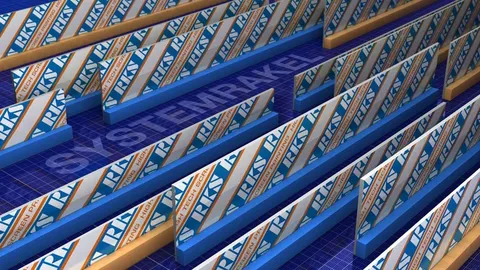
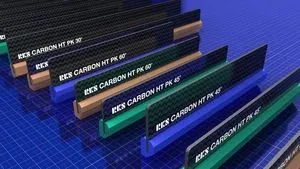
A conventional blade is a solid strip of polyurethane, typically 5 to 10 mm thick and 20 to 50 mm high, cut a few centimetres longer than the image on each side. The free height, the part that sticks out of the holder, decides how much the blade flexes. A stabilised or two-component blade adds a carrier: a thin polyurethane strip, 13 mm high and 6 or 8 mm thick on RKS System blades, bonded to a rigid sheet of glass-fibre or carbon-fibre reinforced plastic. The carrier holds the blade straight and the small polyurethane edge does the printing.
Blade materials
Almost all industrial squeegee blades are polyurethane (PU). It is tough, wears slowly and is made in a wide range of hardness. Vulkollan is a polyurethane grade made without softeners, with good resistance to solvents and abrasion; RKS uses it on its System, Carbon S and rotary blades. RKS also makes its own HT polyurethane for UV and solvent inks and for pastes, used on the HT1, HT3 and Carbon BW blades.
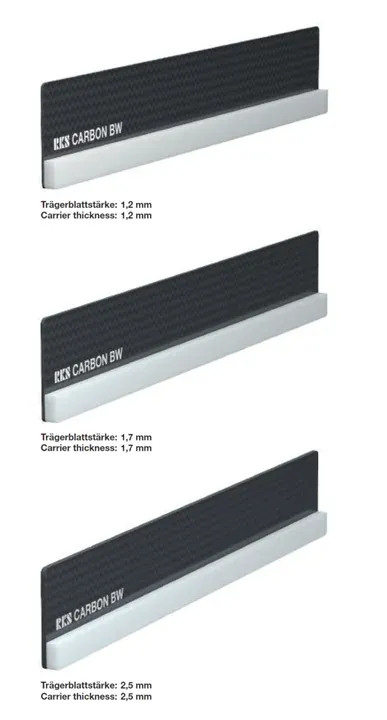
The weakness of polyurethane is that solvents and some ink ingredients soak into it. The blade swells, its Shore hardness drops and it loses stiffness, so the real angle and pressure drift during a run. Carriers are the answer: glass-fibre reinforced plastic (GRP) on RKS System and RS blades, carbon-fibre reinforced plastic (CRP) on the RKS Carbon and RS WP blades. Carbon is stiffer than glass fibre, so a carbon-backed blade can be thinner and more flexible for the same stability, and from a 1.7 mm carrier it carries static charge away through the machine earthing.
Hardness and Shore A
Blade hardness is measured on the Shore A scale, also called durometer. Squeegee blades run from about 55 (soft) to 95 (very hard) Shore A. A soft blade follows an uneven surface and puts down a thick ink film. A hard blade holds a sharper edge and puts down a thinner film, which is what fine lines and halftones need. 65 to 75 Shore A is the usual range for general graphic work; the ink maker's data sheet usually names a range.
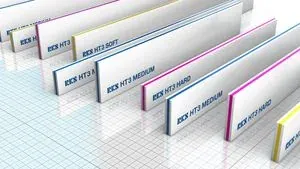
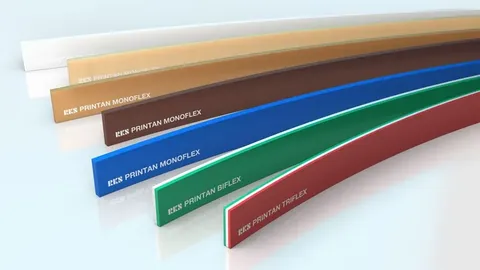
RKS colour-codes its strips so the hardness can be read on the press: on Printan, red is 65, green 75, blue 85 and white 90 Shore A. Some strips combine hardnesses. A dual-durometer strip has a soft printing face on a 95 Shore A backing. A triple-durometer or sandwiched strip, such as the RKS HT3 at 65/90/65, 75/90/75 or 85/90/85, has a hard core between two softer faces, so the blade bends less while the edge stays soft enough to seal. The same 65 Shore A edge also acts harder on a 6 mm strip than on an 8 mm strip.
Edge profiles
The shape of the printing edge changes the deposit as much as the hardness does. A square or flat edge, the standard cut, gives the thinnest and sharpest deposit. A single bevel puts the blade on a slant with a small flat land at the tip and gives a heavier, even deposit; RKS grinds its Carbon BW with a 45 degree chamfer and the Carbon HT PK at 30, 45 or 60 degrees. A double bevel or V edge prints the same in both directions. A rounded edge gives the heaviest deposit and suits textured surfaces, Braille and textile transfers; RKS rotary blades are ordered with a small or large radius.
RKS lists the profiles for its Printan strips as PO, PR, PK, PKR, PK1, PK2, PV, PVR, PV1 and PV2. From the drawings PO appears to be square, PR rounded, PK1 and PK2 a single bevel with a 1 or 2 mm land, PV a V point, and PV1 and PV2 a V with a 1 or 2 mm flat (to be confirmed by Sunstar). A diamond squeegee is a square strip held on its diagonal so that a corner prints.
Holders and mounting
The holder must clamp the blade straight along its whole length and present it to the screen at a set angle. Many presses are fitted with the RKS Type S pneumatic holder, which swivels for blade changes; the RKS Type U holder retrofits to almost any press, and DEK, Baccini and HMI electronics lines have their own holder types. A stabilised blade up to 50 mm high goes into a conventional holder with an aluminium adapter strip; taller blades of 95 to 115 mm clamp directly into RKS holders. An order states height, polyurethane thickness, hardness, length and edge.
Wear and sharpening
A squeegee prints with its edge, and the edge wears. Abrasive inks, high pressure and long runs round it off, solvents swell the polyurethane, and a nick prints as a streak along the whole sheet. Sharpening grinds the worn edge away and restores a flat, square, parallel edge. A blade can be ground many times until the free height becomes too short.
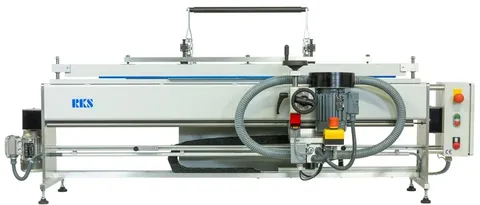
Grinding is done on a squeegee sharpener. Lower-cost machines such as the RKS SM 600 TT and 1200 TT have a double grinding wheel with a coarse and a fine belt, vacuum extraction and an automatic feed, with the grinding head and back stop set by hand. Automatic machines such as the RKS SM series clamp the blade, position it by laser and run a grinding programme at 0.1 mm advance per stroke. ATMA makes the ATS 100 / 150 and ATS 100D sharpeners. Let a used blade rest before grinding so the solvent swelling has gone and the edge is ground at its true size.
How to tell a worn blade
Check the blade when any of these appear on the press.
- Lines and text print wider and softer, and the deposit rises without a change in settings.
- A streak runs along the stroke in the same place on every sheet: a nick in the edge.
- The print is heavier on one side, or the operator keeps adding pressure to clear the image: the edge is no longer straight.
- Against a straight edge in front of a light, the edge shows daylight, rounding or a shiny flattened land.
- The blade looks swollen, feels softer than a new one of the same colour code, or has curled: it needs rest, regrinding or replacement.
Squeegees Sunstar supplies
Sunstar Graphics is the distributor for RKS in India: HT1, Printan and HT3 strips, System and Carbon blades, rotary blades, holders and SM grinding machines, plus ATMA sharpeners. It also supplies Kuroki polyurethane blades from Taiwan. Send an enquiry with your press, ink and mesh for a blade recommendation and a price.